KIDE e-commerce platform features
Everything KIDE does: web store, content, SEO, AI, B2B, POS, inventory, integrations and hosting. The images are from a real store, and every feature opens more detail when you click it.
Web store, blog, gallery, newsletters, Google and Facebook in one system.
No separate WordPress blog, gallery plugin or newsletter service whose data never meets. All six share the same products, customers and languages in the same admin.
Web store
Products and variants, made-to-measure by the centimetre, B2B prices and quotes, POS and inventory. Eight languages on their own country domains.
Blog
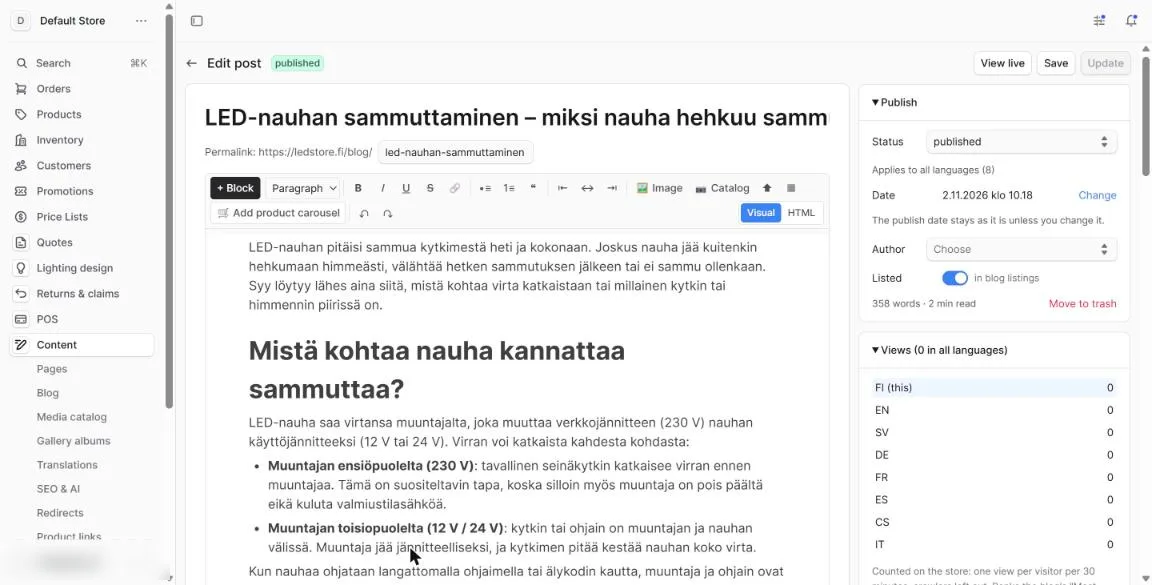
Block editor, product carousels in articles, per-language SEO fields and automatic internal links to products and categories.
Gallery
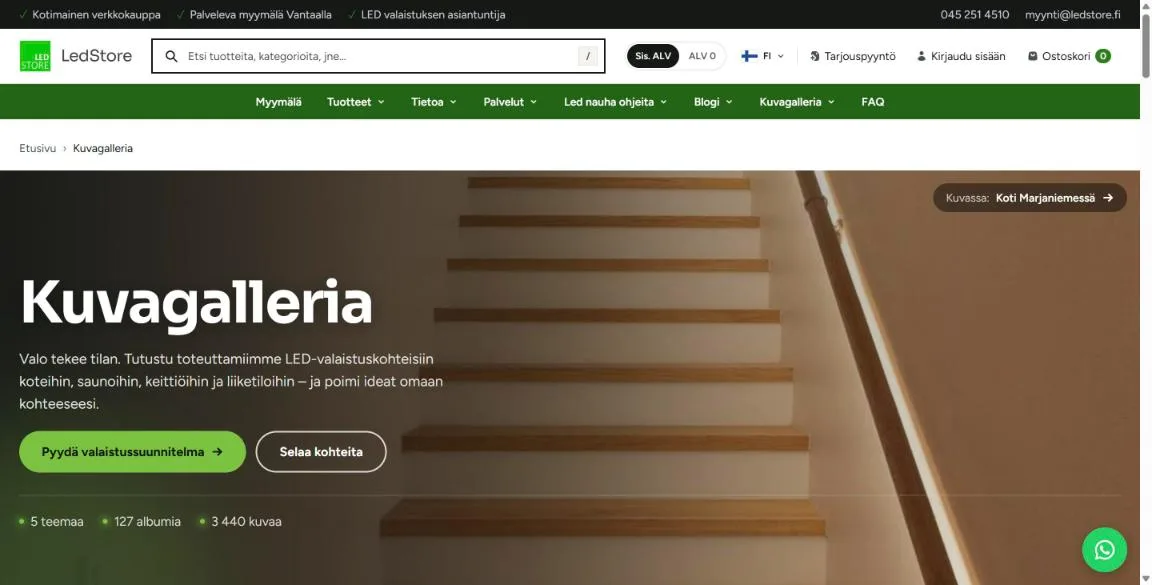
Project photos in albums, links from each photo to the products in it, and the photos in Google's image sitemap.
Newsletters
Campaign editor, audiences straight from the store's customers and orders, and tracking of opens, clicks and sales.
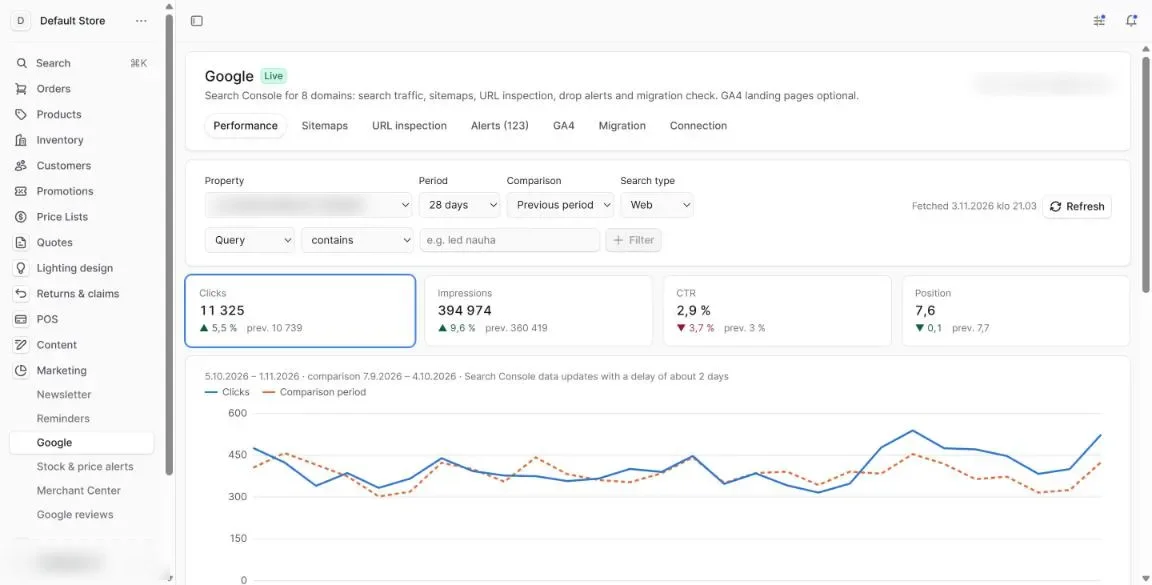
Search Console and rankings in the admin, Merchant Center product feeds, Google Ads conversions and Google reviews.
Facebook login at checkout, the Meta product catalogue for Facebook and Instagram, and Conversions API ad tracking.
Real views from a store in production.
All images are from LedStore, the first store running on KIDE. Customer data is hidden. Click an image to enlarge it.

Everything KIDE does
Click a feature to see what it does. Choose a plan to see what it includes.
A fast store that sells demanding products too
The store is rendered on the server, so pages open fast and Google gets finished HTML. Products can have technical filters, variants, attachments and bundles, and you can sell by the centimetre or metre.
In every plan.
Fast server-rendered store, mobile first
Pages are rendered on the server, so customers and search engines get complete HTML on the first load.
- Built on Next.js, with page data cached and refreshed when you edit content
- Images served as AVIF or WebP in sizes that fit the screen
- Mobile layout with a sticky buy bar on product pages and a bottom menu
- Heavier parts such as the cart drawer and dialogs load only when needed
Categories, attributes and faceted filters
Customers narrow a category by technical attributes and see how many products match each choice.
- Attributes and their values are named in all 8 languages
- Several values in one filter widen the result, different filters narrow it
- Category pages have a banner, intro text, subcategories, sorting and paging
- Filtered views are noindex, with a canonical pointing to the clean category
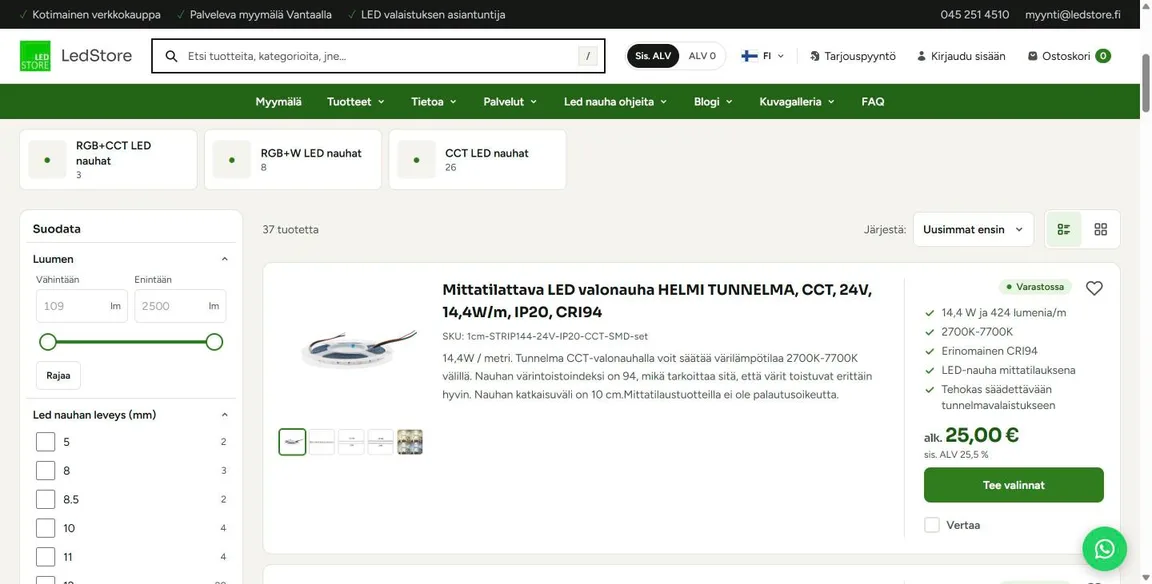
LedStore customers filter LED strips by colour temperature, IP rating and voltage.
Range filters (watts, lumens, size)
Numeric attributes get a range filter with minimum and maximum fields and a slider.
- Works for values such as lumens, watts, watts per metre, lux and cut-out size
- Values come from the attribute data, also from text such as "1400 lm" or "Ø 75 mm"
- The same range filters are available on the search results page
- Sorting by price covers every matching product, and per-cm products are compared at their metre price
A customer looking for downlights sets 400 to 1200 lumens and a 75 mm cut-out.
Product compare, up to 4 side by side
Customers pick up to four products and compare them in one table.
- A Compare option on product cards and product pages, with a compare bar at the bottom of the screen
- Lighting values come first: lumens, colour temperature, CRI, IP rating, power, voltage, dimming and warranty
- Differences are highlighted, and "Show only differences" hides identical rows
- Price, availability and an add-to-cart button for each product
- Shareable link, and on mobile the table scrolls sideways
Colour and model variant groups
Colours or models that are separate products are linked into one group with selectors on the product page.
- Colour dots or text buttons switch between products without a full page reload
- Each product keeps its own indexable page, URL, canonical and hreflang
- Structured data marks the group as a ProductGroup
- Hidden or disabled products drop out of the group automatically
- Manage groups on the product page or on the Variant groups page
A spotlight sold in black and in white shows both versions as colour dots.
Attachments tab: manuals, test reports, IES files
Product pages have an attachments tab for manuals, test reports, IES files and other documents.
- Files are grouped and described in the page language, with icon, type and size
- Upload new files or pick existing ones from the file library
- Set the order of product page tabs, or hide tabs you don't need
- Attachment links are marked nofollow
LedStore moved 578 attachment files for 255 products from its previous shop.
Bundles and set configuratorGrowth
Sell sets where the customer picks the components, with a price and rules of their own.
- The configurator shows component groups and required choices
- Sets stay grouped together in the cart
- A set's availability follows its components, and its delivery time follows the slowest one
- A disabled component can no longer be chosen, and a set with no valid required choice goes off sale
- The shop counter POS sells sets with the same configurator
LedStore sells its 255 set products as configurable bundles.
Products sold per cm or metreGrowth
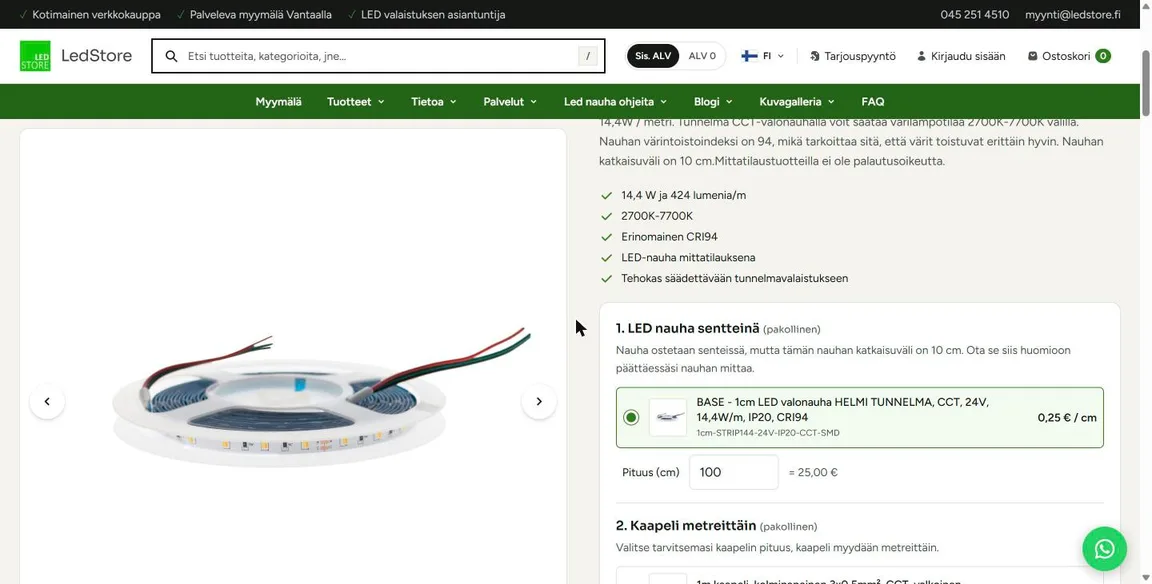
Products such as LED strip can be ordered to an exact length.
- Customers enter the quantity in centimetres, and the price can be shown per metre
- Stock is kept in centimetres and also shown in metres
- Shipping rules and delivery estimates recognise cut-to-length products, with optional extra days
- Quick order accepts lengths such as 250 cm or 2.5 m
- Cut-to-length items can be excluded from customer returns
LedStore sells LED strips by the centimetre.
Lowest 30-day price (EU Omnibus)
When a product is on sale, the shop shows its lowest price from the previous 30 days, as the EU Omnibus rule requires.
- The strike-through price and "Save x %" are calculated from that lowest price
- Price history is stored per variant, price list and currency
- A price history chart on each product in admin
- Product feeds follow the same rule
Built-in search in 8 languages, no extra service
Search runs inside the shop's own database, so there is no separate search service to pay for.
- Handles word endings in Finnish, Swedish, English, German, French, Spanish and Italian, and matches Czech as written
- Press / or Ctrl+K to open a full-width search view with recent and popular searches
- Results show products with image, SKU and price, plus categories and articles
- The results page has the same filters as category pages
- The index updates when products change and is rebuilt every night
Typo tolerance, compound words, synonyms
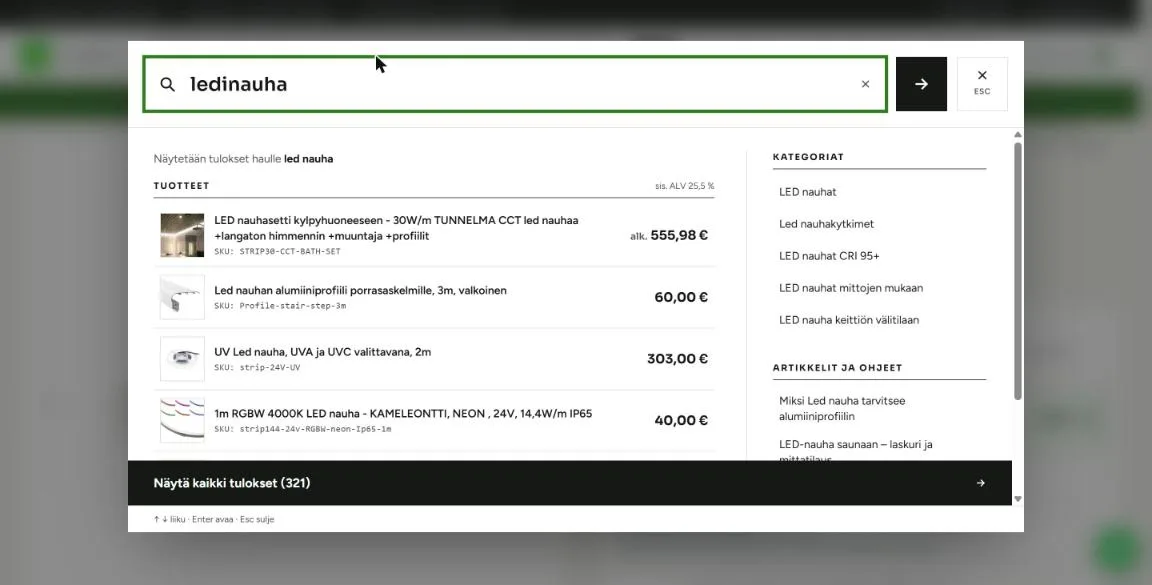
Search finds products even when a word is misspelled, a compound is written differently or the customer uses another term.
- Typo correction with a "Did you mean" suggestion
- Compound words match their parts
- You add synonyms yourself in admin
- Inflected Finnish words still find the right products
A search for "ledinauha" finds LED strip products.
Search by SKU and EAN
Product codes work as search terms in the shop, in quick order, at the shop counter and in admin.
- In the shop search, an exact SKU match ranks above name matches
- Quick order recognises SKUs regardless of letter case, and EAN codes too
- The POS adds a product from its SKU, EAN or barcode
- Staff search admin products by part of a SKU or by EAN
Search statistics and zero-result report
See what customers search for, and which searches return nothing.
- Lists of the most popular searches and of searches with no results
- Add synonyms where customers use different words than your product names
- Run a test search in admin to check the result
- Popular searches are also suggested to customers in the search view
Guest checkout and saved addresses
Customers can buy without an account, and account holders reuse their saved addresses.
- Address book in the customer account for adding and editing addresses
- Business fields for company name, VAT number and business ID
- VAT is shown in the cart already before checkout
- Customers can also create an account with Google or Facebook login
Viva Wallet, MobilePay, Apple Pay, Google Pay
Card and mobile payments go through Viva Wallet.
- Cards, Apple Pay, Google Pay, MobilePay and bank payments
- Payment status updates automatically through webhooks
- Refunds go back through Viva Wallet from the order in admin
- A test mode lets you try the whole checkout before going live
PayPal and invoice for approved customers
PayPal is open to everyone, and invoice payment only to customers you have approved.
- PayPal payments and refunds run through the PayPal API
- Customers cannot choose invoice unless you have enabled it for them
- Payment term is 7 days by default and can be changed per customer
- Mark invoices as paid in admin, and overdue invoices are flagged
- Invoices include IBAN, reference number and RF reference
Shipit: Posti, Matkahuolto, DHL, DSV, pickup points
Labels, pickup points and tracking are handled through Shipit.
- Customers pick a pickup point or parcel locker in checkout
- Create shipments and print labels from the order in admin
- Tracking codes and links go to the order and the shipping email
- Use the carriers and services your Shipit account covers
- Prices come from your own rules: countries, weight steps, €/kg, dimensions and free-shipping limits
LedStore offers PostNord pickup points, parcel lockers and home delivery.
Delivery dates with cut-off times and holidays
Product pages, the freight calculator and checkout show estimated dates for dispatch and delivery.
- A countdown such as "Order within 2 h 15 min to ship today", based on your cut-off time
- Weekends, Finnish public holidays and your own closed days are skipped
- Transit times are set per country and can apply to chosen shipping methods
- Items not in stock add their own lead time
- No date is shown when availability is unknown
With a 13:00 cut-off, an order placed on Friday afternoon ships on Monday.
Finnish postcode and street autofill
In Finland, the postcode fills in the town and the street field suggests street names.
- Works in checkout and in the customer's address book
- Town name in Swedish on the Swedish shop, otherwise in Finnish
- Never overwrites what the customer or the browser has typed
- An unknown postcode shows a hint but does not block the order
- Based on Posti's free postcode data, updated at least once a year
EU VAT: OSS, VIES-checked reverse charge, export
VAT is calculated by the rules that apply to each buyer and destination.
- Consumers in other EU countries pay their own country's VAT under OSS
- EU business customers get 0 % only after their VAT number passes a VIES check
- If VIES is down, a 0 % order is blocked, and a manually recorded check is valid for 30 days
- Exports outside the EU, including the UK, are zero-rated
- Invoices and credit notes state the legal basis for 0 % VAT
Customs data for non-EU shipmentsGrowth
Shipments outside the EU carry the customs details carriers need.
- HS code, country of origin, value and weight for each line
- A pro forma invoice is created with the shipment
- The details go to Shipit together with the shipment
Technical SEO built in, search data in the admin
URLs, language versions, sitemaps and structured data are handled automatically. When a product is removed, its URL redirects to the right category, so visitors don't hit an error page. Search Console data shows right in the admin, and the Store Watch add-on warns you of search drops every day.
In every plan.
Language URLs, canonical and hreflang across domains
Each language has its own URLs, and each language shop can run on its own domain.
- Every page lists all its language versions with hreflang, plus x-default
- An absolute self-canonical on every page
- Paged and filtered views get the right canonical and noindex rules
- Old country-prefix URLs redirect with a 301 to the right domain
- The language switcher keeps the customer on the same product or category
LedStore runs eight language shops on their own domains, from ledstore.fi to led-stores.it.
XML and image sitemaps per domain
Each domain has its own XML sitemap with image entries.
- Covers products, categories, blog, gallery and content pages
- Each domain's robots.txt points to its own sitemap
- Disabled products and noindex pages are left out
- Submit sitemaps to Google from the admin's Search Console page
Structured data for products, reviews, articles, FAQ
Pages output schema.org structured data so search engines can show rich results.
- Product and Offer with price, availability, shipping details and return policy
- Ratings and reviews only from approved customer reviews
- BlogPosting, FAQPage, BreadcrumbList and image galleries
- Organization and LocalBusiness with opening hours and holiday exceptions
301 redirect manager and legacy URL mapping
Old links keep working when URLs change or when you move from another platform.
- Manage redirects in admin, or in bulk through import
- Changing a product, category or page URL creates a 301 automatically
- URLs from the old platform can be kept as they are or mapped to new pages
- The domain switch check finds pages that would return 404 and adds a redirect with one click
LedStore kept its old shop's URLs in every language and redirected removed products to their categories.
IndexNow, llms.txt and AI crawler controls
Tell search engines about changes right away, and decide which AI crawlers may read the shop.
- IndexNow notifies Bing and Yandex when a product, category or article changes
- llms.txt on every domain with company facts and links to key pages
- Separate switches in admin for AI search bots and AI training bots
- Googlebot and Bingbot are always allowed
Google Merchant and Meta catalogue feedsGrowth
Product feeds for Google Merchant Center and the Meta catalogue are generated for every language and domain.
- Prices include the shop's VAT, and availability comes from stock
- Shipping cost is calculated from your shipping rules
- Product IDs match the ones sent by GA4 and the Meta Pixel
- Technical details and custom labels for grouping campaigns
- A separate product reviews feed for Google
Merchant API: fast price and stock updatesGrowth
Price and stock changes reach Google within minutes, ahead of the next daily feed fetch.
- Changes are sent about 90 seconds after an edit, at the latest within 10 minutes
- Only changed products are sent, with exactly the same price as in the feed
- Google's product statuses and rejection reasons are shown in admin
- Store pickup stock and simple promotions can be sent to Google too
Search Console dashboardGrowth
Search Console data for all your domains on one admin page.
- Clicks, impressions, CTR and position by query, page, country and device, with period comparison
- Sitemap status and URL inspection without leaving the admin
- Product and category pages show their own top search queries
- Daily drop alerts are part of the Store Watch add-on
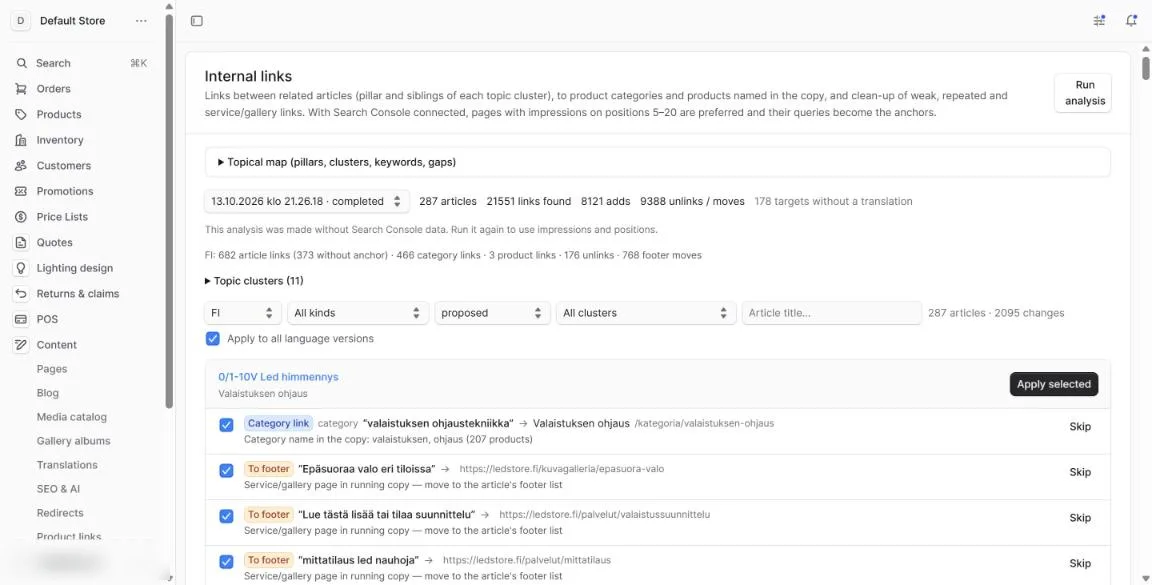
Internal linking suggestions from search dataGrowth
The linking tool reads Search Console data and suggests which pages your articles should link to, and with which anchor text.
- Favours target pages ranking in positions 5 to 20, where an extra link helps most
- Anchor text comes from real search queries found in the article
- Skips queries another page already ranks for, to avoid cannibalisation
- Links only running text, within link density limits
- Preview, apply to all language versions and undo
Product carousels and links in blog articles
Articles show products as carousels and link to them in the text.
- Find products for a carousel by SKU, name or brand in the editor
- Each language version shows that language's product names and URLs
- Broken product links are found and fixed automatically when a good match exists
- The article sidebar lists the products featured in the article
- When no anchor fits in a language version, the product goes into its carousel
Per-language SEO fields with previews
Every product, category, article and page has its own SEO title, meta description and URL in each language.
- A Google preview shows how the search result will look
- Open Graph texts, canonical and a noindex option for special cases
- Admin product search finds items missing an SEO title or description in a chosen language
- Changing a URL creates a 301 redirect
Core Web Vitals tuning and Lighthouse audit
Page speed is measured with Lighthouse and tuned as part of building the shop.
- Images in AVIF or WebP with fixed sizes, so the layout does not jump while loading
- Code and dialogs that are not needed right away load later
- Accessibility, best practices and SEO are checked in the same audit
- Key templates such as home, category, product and article pages are tested on mobile and desktop
Domain switch check against Search ConsoleGrowth
Before you move domains or platforms, check that your most-clicked pages still work.
- Fetches each domain's 1,000 most-clicked pages from the last 90 days in Search Console
- A page passes if it loads directly or after one permanent redirect
- Redirect chains and broken pages are listed by the clicks at risk
- Add a missing redirect with one click, or export the list as CSV
- Automatic redirects for removed products' URLs
- Management of search and AI bots
Train your own AI on your shop's data
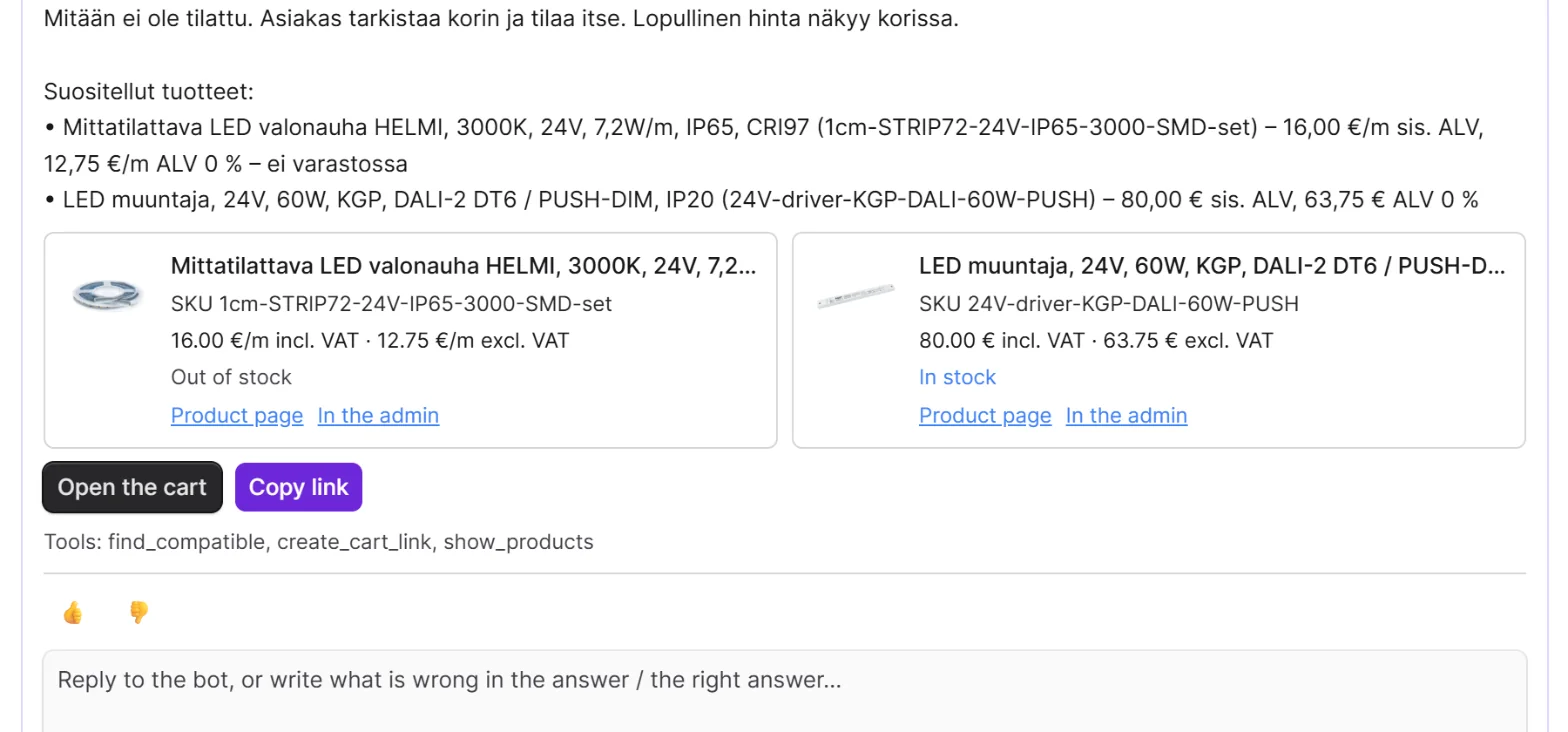
KIDE's AI is part of the shop, not an external chat widget. It learns from the shop's own history: e-mails, design tickets with attachments, products, blog and FAQ. Prices and stock are always fetched from the shop at answer time. Learned knowledge is approved before use, and the bot keeps learning.
Growth and Enterprise · €99 / month + AI costs · onboarding €1,000–5,000
- The merchant chooses the sources: products, blog and FAQ, design tickets and mailboxes
- E-mail is sorted before learning: newsletters, ads and mass mail out
- Only pseudonymised text to the AI; the knowledge base lives in the shop's own database
- A cost estimate before every training run and a cost cap per channel
- Staff approve learned knowledge and correct answers – the bot learns from corrections
- Retraining handles only new and changed sources
- Shop chat in every shop language, cart links and quote drafts
- E-mail replies into the shop's own mailbox: draft, semi- or fully automatic
- WhatsApp drafts and a staff bot on the same knowledge base
- Newsletters with AI: Improve with the bot and a campaign plan using Search Console data
AI does the work, you decide
Daily growth tasks tell you every morning what to improve, and the Do it with AI button prepares the fix. The AI agent also handles bulk changes, translations and SEO texts. Every change is shown as before and after and published only when you approve it.
More about daily growth tasks →
Your own AI that learns from the shop's history →
In Enterprise. An add-on module for other plans.
Machine translation with review (DeepL)Growth
Translate products, categories and content into the other shop languages with DeepL.
- A translation matrix shows what is missing in each language
- Translations run in a queue, with a cost estimate before you start
- Content pages are translated into drafts that you check and publish
- When the source text changes, its old translations are marked as outdated
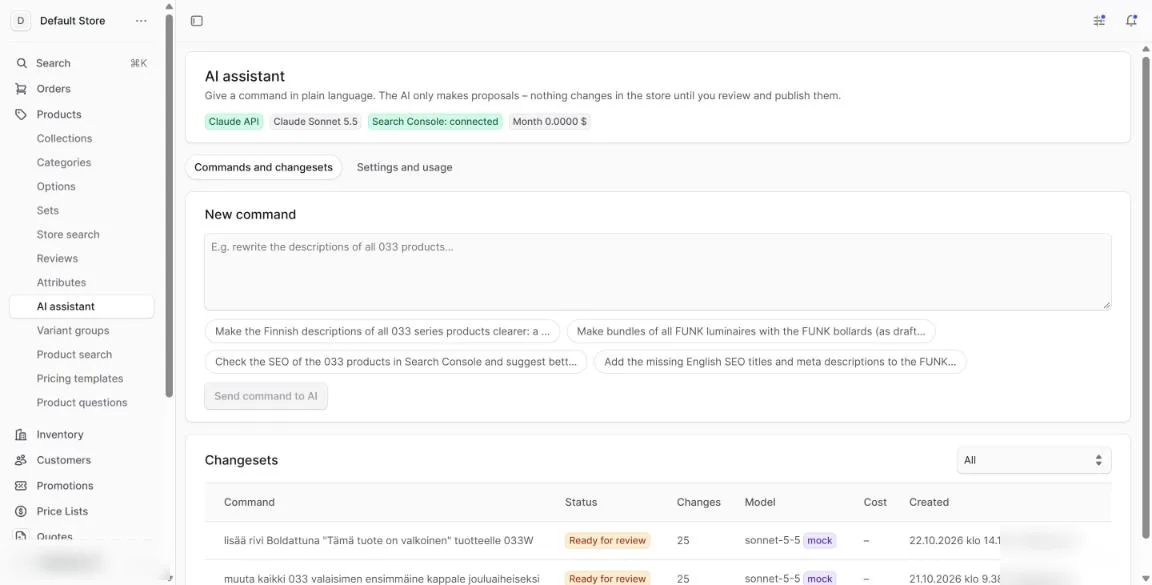
AI assistant: describe a change, review the diff, publishEnterprise
Describe a change in plain language, review what the AI suggests, and publish only what you approve.
- Edits texts, translations, SEO fields, categories, attributes and prices across many products
- Each change shows before and after side by side, and you can edit it
- Approve or reject one by one or all at once
- Publishing checks for conflicts with edits made elsewhere, and can be undone
- A monthly cost cap stops new requests when it is reached
"Add the missing English SEO titles and meta descriptions to this product series."
AI translation and content suggestionsEnterprise
Use Anthropic's Claude for translations and for suggestions that improve product and category content.
- Claude can translate alongside DeepL or in its place
- Suggests clearer descriptions, SEO texts and missing technical values found in product descriptions
- Can use Search Console figures when improving texts
- Content pages can be AI-translated into drafts
- Nothing changes in the shop until you approve it
Bulk price changes with safety checksEnterprise
Change prices by a percentage or a euro amount across many products at once.
- Select products by search, category, brand or series
- Round to cents, or to prices ending in .90 or .95
- Shows old and new price, the price with VAT and the margin for each variant
- Changes over ±50 % or below the purchase price need a separate confirmation
- Price history and the 30-day lowest price update automatically
- Daily growth tasks: 5–10 improvements a day from Search Console, GA4 and store dataEnterprise
- AI highlights for product pagesEnterprise
- AI sales insights on B2B customersEnterprise
- MCP server: your own AI tools can work with the store in a controlled wayEnterprise
Blog, pages and gallery next to your products
The block editor builds pages, the blog and product texts. Products drop straight into articles, and in the reference gallery images are tagged with products, so inspiration leads to buying.
In every plan.
Block editor for pages, blog and product text
A WordPress-style block editor (BlockNote) is used for articles, pages, and product and category descriptions.
- Add blocks with "+ Block" or by typing /
- Blocks for product carousel, gallery, FAQ, button, video, table and custom HTML
- Visual and HTML views, and images from the media library
- HTML that cannot be converted exactly stays as a custom HTML block, so nothing is lost
- In the blog: SEO panel, revisions, trash and scheduled publishing
Blog with authors, categories and scheduling
A full blog with authors, categories, tags and scheduled publishing.
- WordPress-style article list with SEO panel, revisions and trash
- Articles have a reading progress bar, table of contents, author box and related articles
- Category tree with article counts in the sidebar
- Share buttons without tracking scripts
- BlogPosting, breadcrumb and FAQ structured data
LedStore moved more than 2,000 language versions of its WordPress blog articles.
FAQ pages and opening hours
FAQ pages in every language, and opening hours that know the Finnish public holidays.
- Holidays are calculated every year, and the store is closed on them unless you choose otherwise
- Exception days for closures or special hours, with a note in each language
- A notice in the top bar a few days before an exception
- Opening hours appear in the footer, on the contact page and in LocalBusiness structured data
- FAQ content is output as FAQPage structured data
Customer reviews and product questions
Customers rate products and ask questions on the product page, and you moderate both.
- 1 to 5 stars, a verified purchase badge and a reply from the shop
- Stars in product lists and in structured data, from approved reviews only
- A review request email a set number of days after delivery, only with consent
- "Ask about this product" form, and your answer can be emailed and published
- Published answers show only the asker's first name, with their permission
Reference gallery with product taggingEnterprise
Show finished projects in albums, and link the products used in each photo.
- Albums and galleries with a lightbox view
- Tagged products link to their product pages
- Product pages show photos from projects where the product was used
- Gallery pages are in the sitemap with image structured data
Image search across projectsEnterprise
A public image search where customers browse project photos with filters.
- Filters for room, lighting style, product, project type and light tone, plus free text
- A page for each reference project
- Only photos you have approved are shown
- Texts are translated into all shop languages once a translation key is set
- The same image catalogue is available in the editors through a Catalog button
B2B e-commerce without plugins
Business customers get their own accounts, employees, spending limits and price lists. Quotes are made from the cart or by a sales rep and approved online, and EU sales work with 0 % VAT after a VIES check.
In Growth and Enterprise. An add-on module for Essential.
Company accounts with employees and spending limitsGrowth
A business customer gets a company account, and several employees buy under the same company.
- Staff decide in admin whether a customer is a consumer or a business, and open the company account
- Spending limits for employees
- The company's prices apply to every employee
- Customers cannot create a company or change their own pricing
Order approvals inside the companyGrowth
A company can require that its own admin approves a cart before it becomes an order.
- Approval rules are set per company
- Only the company admin sees and handles approvals
- Approval links take the approver straight to the cart
- Other employees use their account normally without the approvals section
Price lists by customer and categoryGrowth
Pricing templates give a customer or a company a discount percentage per product category.
- The most specific category wins, with a default percentage for other products
- Logged-in customers see "Your price" next to the struck-out list price
- The same price carries through cart, quotes, POS, invoice and Procountor
- Customer prices never appear in public feeds or cached pages
- It does not stack with a public sale: the customer gets the lower of the two prices
LedStore's reseller template: 25 % off web shop products, 10 % off electrical supplies.
Quotes: from cart, from staff, accepted onlineGrowth
Quotes start from a customer's cart, a calculator or a salesperson, and the customer accepts them online.
- "Request a quote for this cart" also works without logging in
- Staff edit lines, discounts in € or %, shipping and the validity date
- Sales staff can also create a new quote from scratch
- The customer accepts or declines, and an accepted quote becomes an order
- A message thread stays with the quote
Quick order by SKU paste or CSVGrowth
Business buyers paste SKUs and quantities or upload a CSV, and the lines go into the cart.
- Accepts spaces, semicolons, tabs or commas as separators, and the cart's own CSV export
- Lengths for per-cm products in centimetres or metres
- A preview shows price, availability and any error on each line before adding
- Quantities follow minimum order and pack size rules
Saved purchase lists and reorderGrowth
Customers save a cart as a named purchase list and order it again later.
- Lists keep products, quantities and set choices
- "Order again" checks current prices and availability before adding to the cart
- Favourites with a heart icon, saved in the browser for guests until they log in
- Up to 50 lists per customer
Duplicate orders and quotes for another customerGrowth
Staff copy an existing order or quote as a new draft, for the same customer or another one.
- The copy uses today's prices
- Discontinued or unpublished products are left out and listed
- Orders imported from the previous shop can be copied too
- The customer gets no confirmation until staff press the send button
- Recurring orders on an agreed scheduleGrowth
A POS that shares stock with the web store
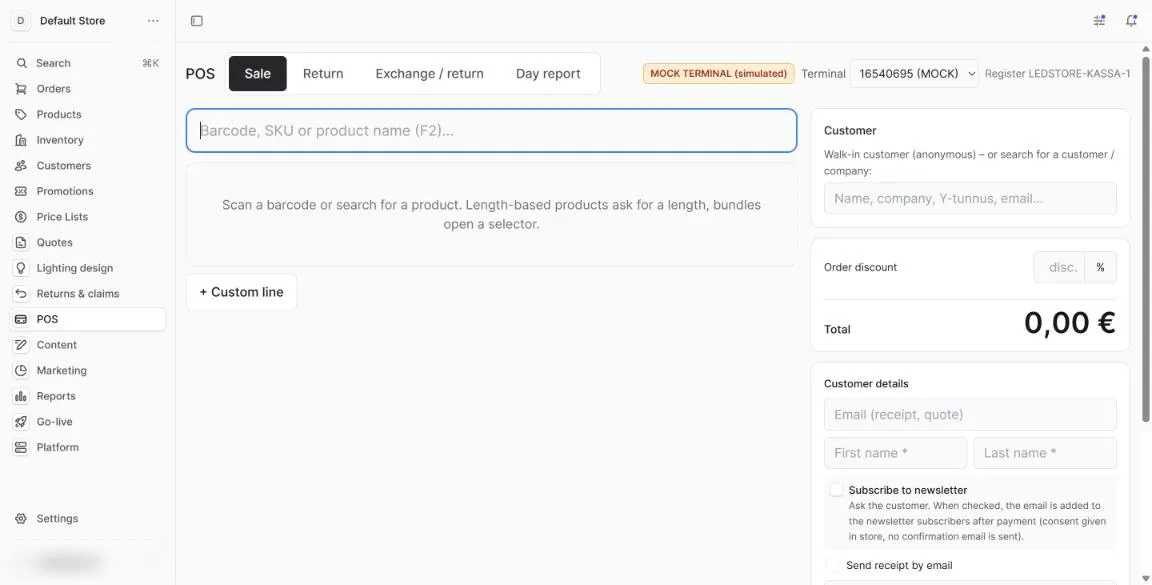
The shop POS works with a barcode scanner and a Nets or Viva terminal. Invoice customers can pay by invoice at the till, and loyalty points build up both online and in the shop.
In Growth and Enterprise. An add-on module for Essential.
Order tracking with custom statuses
Every order has an order status and a payment status, colour-coded and easy to scan.
- 12 order and 12 payment statuses, with names, colours and order you can edit
- One search box finds orders by number, name, email, SKU, invoice number or tracking code
- Filters, saved searches and CSV or Excel export
- Bulk status changes with an optional customer notification
- Customers see the status in their account
Order editing with history
Change lines, quantities, prices, discounts and shipping on an order that has already been placed.
- Editing an invoiced, paid or shipped order asks you to confirm a warning first
- Every change is recorded in the order history
- An updated order confirmation goes out only when you press the button
Refunds through the payment provider
Refunds are made from the order page in a guided window.
- Pick lines and quantities, restock per line and refund all or part of the shipping
- The amount is calculated with a VAT breakdown, and you can adjust it with a reason
- Viva Wallet and PayPal payments are refunded through their APIs
- A failed refund shows a clear status with "Retry" or "Mark as refunded manually"
- The same refund cannot be sent twice
POS with barcode scanner and card terminalGrowth
A shop counter till inside the admin, made for a tablet or a counter computer.
- Add products with a barcode scanner, SKU or search
- Card payments on a Viva payment terminal, plus cash, MobilePay and split payments
- Line and total discounts, and business customers with their own prices
- Sells per-metre products by length and sets through the configurator
- Each sale is a normal order and reduces stock
Receipts, cash drawer, X and Z reportsGrowth
The till prints receipts and closes each day with a cash count.
- Receipts for 72 or 80 mm printers through the browser, also as PDF
- The X report shows the day's sales, refunds and payment methods at any time
- Closing the day (Z) records counted cash, the float and the amount to bank, with a running number
- Returns and exchanges at the counter, refunded to card on the terminal or in cash
Customer returns portal with return labelsGrowth
Customers start a return or a complaint from their account or from the order link.
- Returns within 14 days, and complaints with photos, video or PDF
- Choose a postal return or a free drop-off at the store
- A Shipit return label and return instructions as PDF
- Each request becomes a ticket in admin, with a conversation in the customer's account
- Made-to-measure and cut items can be excluded
Credit notes and Procountor exportGrowth
Every refund produces a credit note, and orders and credit notes can be sent to Procountor.
- Credit notes have their own number series and a PDF in Finnish, Swedish or English
- Email the credit note to the customer with the PDF attached
- Orders go to Procountor as sales invoices, one at a time or in bulk
- Credit notes go to Procountor as drafts for you to approve there
- Nets and Viva terminalsGrowth
- Invoice customers at the tillGrowth
- Loyalty points (add-on module)Growth
Batches, best-before and FEFO
Inventory tracks batches and best-before dates and picks the earliest-expiring first (FEFO). Transfers between warehouses, stocktaking, shelf labels and purchase orders to suppliers come with it. A good fit for food, cosmetics and health product stores.
In Enterprise. An add-on module for other plans.
Stock, reorder points and suppliersEnterprise
Stock is managed inside the shop, with a reason recorded for every change.
- Reorder point, order quantity and product type: stock item, made to order, pre-order or discontinued
- Choose per product whether backorders are allowed
- Stock is reserved at checkout, reduced on shipment and restored by returns
- A supplier register
- A set's availability follows its components
Purchase orders and goods receivingEnterprise
Create purchase orders to suppliers and receive the goods into stock.
- Purchase orders per supplier with products and quantities
- Freight costs can be allocated to the received products
- Receiving updates stock and records a stock movement
- Products below their reorder point are one quick filter away
- Batch and best-before tracking, FEFO pickingEnterprise
- Stock transfers and stocktakingEnterprise
- Shelf labelsEnterprise
Accounting, ERP and your own systems
Sales are posted to Netvisor or Procountor. The ERP connector framework sends orders through a queue and retries automatically if the other end doesn't answer. When you replace your ERP, the new connector can run in shadow mode next to the old one, and differences are reported before the switch.
In Growth and Enterprise. An add-on module for Essential.
Viva Wallet, Stripe, PayPal and Shipit
The payment and shipping integrations are included and ready to connect to your accounts.
- Viva Wallet for cards, mobile wallets and the shop counter card terminal
- PayPal with webhook signature checks and refunds
- Stripe Checkout card payments with webhook signature checks and refunds
- Shipit for pickup points, labels, tracking and return labels
- Credentials are stored encrypted in admin, with a "Test connection" button
- A test mode works before you have credentials
Procountor accountingGrowth
Orders become sales invoices in Procountor, one at a time or in bulk.
- A preview shows lines, totals, VAT treatment, due date and reference before sending
- Credit notes are sent as drafts
- Monthly sales as Procountor import files, split by payment method and OSS country
- Export status and errors are shown on each order
Google Merchant Center and Meta CommerceGrowth
Connect your catalogue to Google Merchant Center and Meta Commerce Manager.
- A feed for each language on each domain
- Fast price and stock updates to Google through the Merchant API
- Google's product statuses and rejections are shown in admin
- The Meta Pixel and Conversions API use the same product IDs as the feed
Any system with an API, built to orderGrowth
If a system you use has an API, an integration with it can be built for you as a separate project.
- Accounting, for example Netvisor, Visma, Fennoa or Lemonsoft
- Payments, for example Paytrail or Klarna
- Shipping, for example nShift
- Marketing and CRM, for example Klaviyo or HubSpot
- Built as its own module, so the platform core stays untouched
Calculators and configurators with cart import APIEnterprise
Calculators and configurators can put a finished parts list straight into the cart.
- A cart import API accepts lines from a calculator or an outside tool
- Customers can also send the result as a quote request
- Quote requests from calculators appear in admin and can be turned into quotes
- Made-to-measure parts are accepted, as in quick order
LedStore's kitchen and sauna lighting calculators and its LED strip selector add their results to the cart.
8 developer hours per month for custom workEnterprise
The plan includes eight hours of developer time each month for changes you choose.
- Use them for small features, adjustments, reports or integration work
- You decide what gets done first
- Larger work is agreed and estimated separately
- Netvisor accountingGrowth
- ERP connector framework: order queue, retries and shadow modeGrowth
Many countries, one admin
Every language has its own URLs and, if you like, its own country domain. LedStore sells on KIDE in eight languages on eight domains from one admin.
In every plan.
- Language-specific URLs, canonical and hreflang across domains
- Sitemaps and image sitemaps per domain
- Email templates in every language
Machine translation with review (DeepL)Growth
Translate products, categories and content into the other shop languages with DeepL.
- A translation matrix shows what is missing in each language
- Translations run in a queue, with a cost estimate before you start
- Content pages are translated into drafts that you check and publish
- When the source text changes, its old translations are marked as outdated
AI translation and content suggestionsEnterprise
Use Anthropic's Claude for translations and for suggestions that improve product and category content.
- Claude can translate alongside DeepL or in its place
- Suggests clearer descriptions, SEO texts and missing technical values found in product descriptions
- Can use Search Console figures when improving texts
- Content pages can be AI-translated into drafts
- Nothing changes in the shop until you approve it
- Search in every language without an extra service
Newsletters, feeds and tracking together
Newsletters, abandoned cart reminders, Google and Meta tracking with consent, and product feeds work without separate services.
In every plan.
- Newsletters with AI: Improve with the bot rewrites a draft with in-stock products and the shop's own expertise, and the campaign plan builds a 1–4 letters a month calendar with ready drafts from the knowledge base, seasons, blog and Search Console searches. Nothing is sent automatically. Requires your own AI (€99 / month + AI costs). →
Consent manager with Google Consent Mode v2
A built-in cookie banner that controls every tracking tag through Google Consent Mode v2.
- Categories: necessary, preferences, analytics and marketing
- The banner is part of the server-rendered HTML, so it does not shift the page
- Consent Mode starts as denied and updates when the visitor chooses
- A "Cookie settings" link lets visitors change their choice later
- Consents are logged
GA4, Google Ads, Meta Pixel and Conversions API
Tracking codes are set in admin and load only after the visitor consents.
- GA4 and Google Tag Manager with e-commerce events
- Google Ads purchase conversion with Enhanced Conversions
- Meta Pixel in the browser and the Conversions API from the server
- Microsoft Clarity, and site verification for Google and Bing
Newsletter sign-up with double opt-in
New subscribers confirm their address by email before they are added to the list.
- Confirmation and unsubscribe pages in every shop language
- Subscriber list in admin with CSV export and manual unsubscribe
- Only confirmed subscribers receive campaigns
- One-click unsubscribe in every newsletter
Newsletter campaigns, segments and calendarGrowth
Write and send newsletters from the admin in all shop languages.
- Email-safe blocks: hero, text, image, button, product grid, blog highlight and two columns
- Copy or machine-translate a campaign into other languages
- Audience by language, domain, customer type, customer group and tags
- Test send, scheduling, batched sending and a log per recipient
- A newsletter calendar for planning issues by date
Abandoned cart and quote remindersGrowth
Automatic reminder emails for carts left behind and quotes waiting for an answer.
- Two cart reminders with a link that restores the cart
- Sent only with marketing consent, and every message has an opt-out link
- Quote reminders and a notice before a quote expires
- Statistics on clicks and recovered orders
- All reminders stay off until you switch them on
Google review requests after deliveryEnterprise
Ask customers for a review after their order, only when they have given permission in checkout.
- A personal WhatsApp message asks for a Google review a week after the order
- One reminder only if no review was found, and STOP replies are respected
- At most one request series per customer per year
- Google Customer Reviews opt-in on the order confirmation page
- Product review requests by email a set number of days after delivery
WhatsApp Business messagesEnterprise
Send WhatsApp messages to customers who have agreed to them in checkout.
- An optional WhatsApp consent checkbox in checkout
- Messages use approved WhatsApp Business templates and go out on weekdays in the daytime
- Delivery receipts and STOP replies come back automatically
- Currently used for review requests after an order
- A floating WhatsApp button lets shoppers start a chat with you
Everyday tools
Imports and exports with templates, change history with undo, staff roles and ticketing.
In every plan.
Email templates in 8 languages
Every customer email has its own template for each event and each language.
- Order confirmation, shipping, quotes, password reset, returns, credit notes and more
- Product images on order, shipping and quote emails
- Preview and test send in admin
- Sent emails are logged and can be resent
- Customers' replies to order emails show up on the order
Google and Facebook customer login
Customers sign in or create an account with Google or Facebook.
- Login buttons in all 8 shop languages
- A verified email that matches an existing account is linked to it, so company prices and orders stay
- Return links started in another browser are rejected
- The buttons appear once you have saved the Google or Facebook app credentials
- Staff still sign in with email, password and MFA
XLSX and CSV import and export with presets
Move products, variants, prices, categories and redirects in and out as Excel or CSV files.
- Presets for basics, prices, SEO, translations, attributes, images and visibility, or your own columns
- Columns are matched automatically or by hand
- Every row is checked, with a 5-row preview and a downloadable change report
- A price guard warns about unusual price changes
- Large imports run in the background and can be undone as one batch
Change history with one-click undo
Every change made in the admin is recorded with its before and after values, and can be undone.
- Covers products, prices, categories, translations, SEO, blog, redirects, shipping and more
- Shows who made the change and where it came from: admin, import, AI or API key
- Undo a single change or a whole batch, with a conflict check
- An Undo notice and Ctrl+Z right after a change
- History is kept for 90 days
Roles and permissions for staff
Give each staff member access only to the admin sections they need.
- Read and Write ticks for each admin section
- Templates such as product manager, blogger, sales and POS, customer service and marketing
- An Administrator switch gives full access
- Rights are set already when you invite a new user
- Every admin request checks the user's rights, and the last administrator cannot be removed
Helpdesk tickets and formsGrowth
Customer requests and form submissions land in one ticket queue.
- Forms embedded on service pages, with file attachments
- Incoming email becomes tickets, and replies go out by email
- Internal notes, macros, statuses, categories and agents
- See when a colleague is viewing the same ticket
- Send a payment link or an invoice straight from a ticket
Own server in Helsinki, updates without downtime
Every store runs on its own server in Hetzner's Helsinki data centre. Updates start the new version next to the old one, and traffic moves only when the new one works. If anything goes wrong, it rolls back to the previous version automatically. Measured downtime during LedStore's updates has been 0 seconds.
In every plan.
Your own server in the EU (Helsinki)
The shop runs on its own server in a Helsinki data centre, so the data stays in the EU.
- Short response times for customers in Finland
- The database, shop, admin and HTTPS run on your own server
- A data processing agreement is in place with the hosting provider
Nightly encrypted off-site backups
Every night the database is backed up and stored encrypted in a separate storage location.
- Copies are kept for 14 days, 8 weeks and 12 months
- Product images, blog and gallery images and attachments are included
- Restore a single area, such as products or customers, without touching orders
- A comparison shows what would change before anything is restored
MFA for every admin user
Admin users sign in with a password and a one-time code from an authenticator app.
- Each user turns on MFA in their profile
- MFA can be made mandatory, which blocks admin access until it is set up
- Code attempts are limited
- Changing integration credentials requires MFA in production
GDPR export and erasure tools
Find, export and erase a person's data from one admin page.
- Search for a person's data across the shop
- Export as JSON or ZIP
- Erase or anonymise the data
- Requests are tracked against the 30-day deadline, with a log
- Customers can also make requests from their own account
Uptime monitoring and updates
The server is watched around the clock, and the platform is kept up to date as part of the service.
- Services, disk space and the nightly backup are checked every five minutes
- Emails that fail to send are detected
- Problems raise an alert to the maintainer
- Security and platform updates are installed as part of the service
Larger server sized to your trafficEnterprise
For shops with more visitors, the server is sized to match the load.
- More processor power and memory for busy periods
- Capacity is reviewed as the shop grows
- The same setup, monitoring and backups as the standard server
- Zero-downtime updates with automatic rollback
- A maintenance page as fallback if the service doesn't answer
- Cloudflare firewall, rate limiting and bot protection
- Blocking harmful traffic by IP address or country
- Alerts to our operations team and a daily server review
- Store Watch (included in Growth and Enterprise, otherwise €49 / month): a daily AI analysis of your search visibility with your own Claude key
Your SEO toolkit lives inside the store.
KIDE reads your own Google Search Console data and acts on it in the same admin where you edit products, articles and newsletters. Fewer tools, and every fix goes live straight away.
LedStore's result in Google PageSpeed Insights
Real users (Core Web Vitals): passed
Source: Google PageSpeed Insights (Lighthouse 13.6), ledstore.fi, measured 8 November 2026. Open the report ↗
Internal linking
Finds pages ranking in positions 5–20 and the queries behind them, then suggests and adds links with the right anchor text across blog posts and categories.
Products inside articles
Product carousels and product links in blog posts, so content sells and products gain links from relevant text.
Search Console in the admin
Queries, pages, countries and devices for every domain, comparison periods, URL inspection and sitemap submission.
Drop alerts (Store Watch)
The Store Watch add-on checks every day whether a page or query loses clicks or positions, and warns you before it shows in sales.
Core Web Vitals and Lighthouse
Server-rendered pages, optimised images and code loaded only when needed. Stores are tuned and audited with Lighthouse.
Technical SEO on autopilot
Canonicals, hreflang across country domains, XML and image sitemaps, structured data, IndexNow and clean 301 redirects.
Per-language SEO fields
Title, description and URL for every product, category, page and article in every language, with previews.
AI search ready
llms.txt, AI crawler controls and structured answers that make your store easy for AI assistants to cite.
Newsletters that build traffic
Campaigns link straight to products and articles with UTM tags, so you see which emails bring visits and sales.
Domain switch check
Compares your top Search Console pages with the new store after a migration and lists anything that doesn't answer.
Automatic 404 redirects
When a product is removed, its URL redirects to the right category, so visitors and link value are not lost.
Fewer subscriptions for your own site's SEO
For the daily work on your own store, KIDE covers what many merchants pay separate SEO tools for:
- Rank tracking for your own pages
- Site audit
- Internal link tools
- Sitemap plugins
- Redirect plugins
- Rankings come straight from Google's own Search Console data, not estimates.
- Fixes are made in the same place, without exporting CSV files.
- No extra seats or monthly SEO tool fees.
- Competitor research and backlink analysis still need tools such as Semrush or Ahrefs.
Headless architecture, open APIs and your own server.
KIDE is built on the open-source Medusa commerce engine. The storefront and the admin backend are separate and talk through APIs, which is why the store is fast, search-engine friendly and easy to connect to other systems.
Medusa v2 · Next.js · TypeScript · PostgreSQL · Redis · Docker · HTTP/3 · Cloudflare · EU servers
Headless
The storefront is a Next.js app rendered on the server and cached. Search engines get finished HTML, shoppers a fast page.
API-first
Every feature has a REST API: the Store API for the store and the Admin API for management. The POS, calculators and integrations use the same APIs.
Event-driven
Order, payment and shipping events trigger integrations at once: carriers, accounting, ad tracking and customer messages.
Open source
The core is MIT-licensed Medusa and PostgreSQL. No closed app store: the data is yours, exportable as CSV or as the whole database.
Your own server
Every store has its own server, database and media in the EU. A neighbour's campaign never slows your store down.
Performance
HTTP/3, WebP images and pages refreshed automatically when a product, price or stock changes. Aiming at green Core Web Vitals.
Security
HTTPS everywhere, role-based permissions, two-factor login, Cloudflare protection, bot and request limits, and encrypted nightly backups.
Extensible
New features are built as modules in the same TypeScript code base. A developer can work on it without licence fees.
If it has an API, KIDE can talk to it.
The common Nordic services are connected out of the box. Anything else with an API is connected for you as part of onboarding or your development hours.
Connected today
Set up in the admin with your own credentials.
Payments
- Viva Wallet
- Stripe
- MobilePay
- Apple Pay
- Google Pay
- PayPal
- Invoice
Card terminals
- Nets
- Viva
Shipping
- Shipit
- Posti
- Matkahuolto
- DHL
- DSV
Accounting
- Netvisor
- Procountor
Google and Meta
- Merchant Center
- Search Console
- GA4
- Google Ads
- Business Profile
- Meta Pixel & CAPI
- WhatsApp Business
Other
- DeepL
- Anthropic Claude
- VIES
- HMRC
- EPREL
- SMTP / Mandrill
- Google and Facebook login
- Cloudflare
Built to order
Examples of systems we connect on request.
Accounting and ERP
- Visma
- Fennoa
- Lemonsoft
- Microsoft Dynamics
- SAP Business One
Payments
- Paytrail
- Klarna
- Svea
- Walley
Shipping
- nShift
- PostNord
- Budbee
- UPS
- DB Schenker
Marketing and CRM
- Klaviyo
- Mailchimp
- HubSpot
- Pipedrive
- Hintaopas
- PriceRunner
Product data
- Supplier price lists
- PIM systems
- Wholesaler stock feeds
From your old platform to KIDE in four steps.
We have moved a live web store serving eight countries with its products, customers, orders, quotes, reviews and multilingual blog. The same importers run for you.
Audit
We go through your sitemaps and Search Console data, list every URL that brings traffic and map it to its new address.
Import
Products, attributes, images, customers, orders, quotes, reviews, pages, blog posts and 301 redirects.
Run in parallel
Your new store runs on a private beta address with real data while your old store keeps selling. You test, we fix.
Switch
A final delta import, then DNS points to KIDE. Redirects, feeds and webhooks keep working, so Google and your ad campaigns see no gap.
Every migration includes an SEO check before the switch, a test order with every payment method, support on switch day and 30 days of priority help afterwards. Migration prices →
See your own store on KIDE.
In 30 minutes we show what your store would look like on KIDE and what moving it would take.